Your Cheap PSU Is Burning Money While It Sits There Doing Nothing
Here's a scenario that plays out in thousands of home labs across the country: you pick up a cheap switching power supply for a project, use it for a few hours a week, and leave it plugged in the rest of the time because unplugging it is mildly inconvenient. Harmless, right?
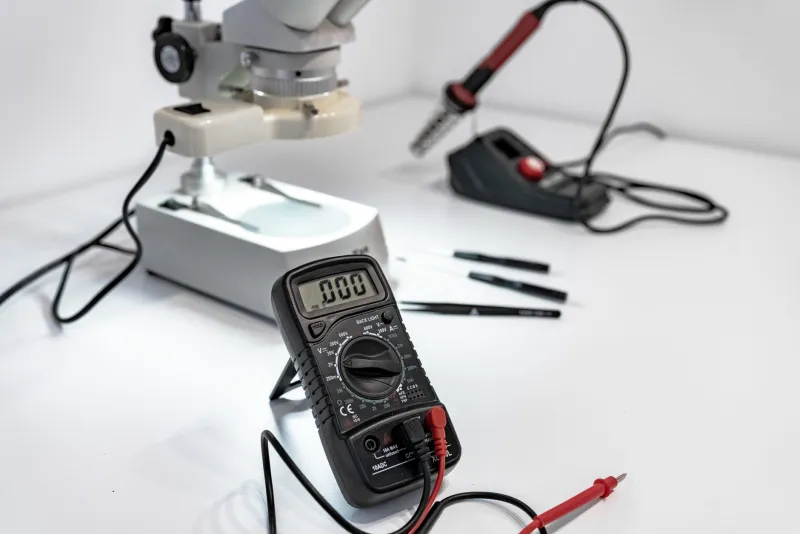
Not quite. That little brick is sipping electricity around the clock, and depending on what's inside it, the tab might surprise you. We grabbed five budget switching supplies — the kind you'd find on Amazon or AliExpress for anywhere between eight and twenty-five bucks — and put them on a kill-a-watt meter to find out what they're actually doing when nobody's watching.
What "Efficiency" Actually Means on a PSU Label
Most budget power supply listings throw around an efficiency percentage like it's a selling point. You'll see numbers like "85% efficiency" stamped on the box or buried in the specs. What that number actually means is that at a specific load — usually somewhere between 50% and 100% of rated capacity — the supply converts 85 cents of every dollar's worth of input power into usable output. The other 15 cents turns into heat.
The problem is that single number hides a lot. Efficiency curves on switching supplies are not flat. They tend to peak somewhere in the middle of the load range and fall off sharply at both extremes. Run one of these units at 10% of its rated load — which is exactly what happens when you've got a microcontroller project drawing 200mA from a 3A supply — and that "85% efficient" label becomes a polite fiction.
We measured it. At 10% load, three of our five test units dropped below 65% efficiency. One genuinely terrible specimen hit 51%. That means nearly half the power going into the wall was disappearing as heat before a single electron reached your circuit.
The Standby Problem Nobody Talks About
Load efficiency is one thing. Standby draw is another beast entirely. Every switching supply has internal circuitry that stays live as long as it's connected to mains power — control chips, startup circuits, the transformer itself idling away. On quality supplies, this parasitic draw is engineered down to fractions of a watt. On cheap ones, nobody really bothered.
Our worst offender pulled 1.8 watts at no load. That's with nothing connected to the output terminals, just sitting there plugged into the wall. At the US average residential electricity rate of around 16 cents per kilowatt-hour, that single supply costs you roughly $2.52 a year to do absolutely nothing. Doesn't sound like much until you remember that the supply itself cost $9.99.
After two years of sitting plugged in, you've spent more on wasted standby power than you paid for the unit. After five years, you've essentially bought it twice over in phantom watts alone.
Our best performer in the standby test drew 0.31 watts — still not zero, but dramatically better. That unit happened to cost $22, which is the high end of our test group. Coincidence? Probably not entirely.
The Real-World Numbers, Laid Out Plainly
We tested each supply at four load points: 0% (standby), 10%, 50%, and 100% of rated output. Here's a condensed look at what we found across the group:
- Standby draw ranged from 0.31W to 1.8W across the five units
- Efficiency at 10% load ranged from 51% to 74%
- Efficiency at 50% load ranged from 72% to 84%
- Efficiency at 100% load ranged from 78% to 87%
The takeaway is obvious once you see it charted out: the gap between the cheapest and priciest units is widest exactly where most hobbyist builds actually operate — light loads, intermittent use, long idle periods.
Manufacturer claims, when they existed at all, consistently overstated efficiency. Two of the five units didn't publish any efficiency spec whatsoever, which is its own kind of answer.
Calculating Your True Cost of Ownership
This is where things get useful. You can run this math yourself in about two minutes.
Step 1: Measure or estimate your average load. If you're running a Raspberry Pi or a small Arduino setup, you're probably pulling 0.5A to 1.5A at 5V. That's 2.5W to 7.5W of actual useful output.
Step 2: Factor in efficiency. If your supply is 65% efficient at that load, divide your output wattage by 0.65 to get real input draw. A 5W load becomes 7.7W at the wall.
Step 3: Add standby time. If the project runs 4 hours a day and idles the other 20, multiply those idle hours by your standby draw.
Step 4: Multiply total daily watt-hours by 365, divide by 1000 to get annual kilowatt-hours, then multiply by your local electricity rate.
For a project running light loads on a mediocre supply in an average US home, you might be looking at $4 to $8 a year in real operating cost. That's not catastrophic, but stack three or four of these on a workbench and it adds up. And if you're building something that runs 24/7 — a home automation node, a network switch, a sensor array — the math gets uglier fast.
What You Can Actually Do About It
The honest answer is that you don't always need to spend more. You need to spend smarter.
Match supply size to your load. A 10A supply running a 500mA load is efficiency suicide. Grab a smaller unit rated closer to your actual draw and you'll operate nearer the efficiency sweet spot.
Use a switched outlet strip. If the project isn't running, kill power to the supply entirely. Zero standby draw beats 1.8W standby draw every time.
Check for an 80 Plus rating. The 80 Plus certification program (common on PC power supplies) guarantees minimum efficiency at multiple load points. Budget wall-brick supplies rarely carry it, but when you find one that does, it means something.
Measure before you trust. A $15 kill-a-watt meter from your local hardware store or Amazon will tell you more about a power supply's actual behavior than any spec sheet. We use one constantly around here, and it has saved us from making some genuinely bad purchasing decisions.
The Bottom Line
Cheap switching supplies aren't inherently evil. Some of them perform reasonably well under the right conditions. But the efficiency curve problem is real, the standby draw problem is real, and the gap between advertised specs and measured performance is real.
If you're building something that runs occasionally on your bench, the phantom watt problem is mostly an annoyance. If you're deploying something that stays powered up for months at a time, it's a legitimate operating expense — and one that cheap supply manufacturers are counting on you not to calculate.
Now you can.